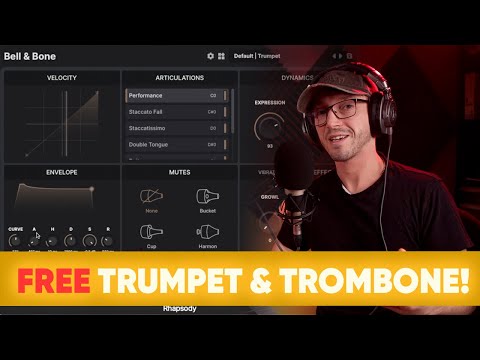
Bell & Bone is a jazz-focused trumpet and trombone sample library.
Both instruments were recorded with an emphasis on phrasing and response, so they feel natural to perform.
The performance articulation keeps things simple. Play short notes, you get short articulations. Hold a line, it connects naturally.
You don’t need to manage keyswitches just to sketch an idea.
Common mutes are included and work as a separate layer. You can switch between unmuted, bucket, cup, and harmon at any time, and apply them to any articulation.
Check out these videos of Guy Michelmore and A Joe Blog Composer using Bell & Bone. They’re using an older version of the library so the interface is a little different but the sound and behaviour are the same.
Bell & Bone includes a range of keyswitched articulations. Each one has its own gain, velocity curve, and AHDSR controls, so you can balance and shape how they behave.
At the centre is the Performance articulation. Instead of switching articulations yourself, it follows how you play and chooses what fits. When you want finer control, you can move to the individual articulations.
Sustains use phase-aligned dynamic layers for smooth transitions, and the short articulations include multiple round robins to keep repeats from sounding mechanical.
Vibrato, growl, and flutter are all adjustable, so you can change the character of a line as you play.
Common mutes are included as a separate layer, with switching between unmuted, bucket, cup, and harmon across all articulations. For a wider selection of mutes, see our Sordina plugin.
Choose from unmuted, bucket, cup, or harmon for that authentic jazz vibe.
Up to 7 idiomatic articulations including shakes, rips, falls, and doits.
The instruments adapt to your playing in real-time. Allowing you to effortlessly perform legato, trills, and slides.
The library includes an optional lazy load feature to minimize RAM usage.
The velocity curve and AHDSR envelope can be set independently for each articulation.
Bell & Bone includes dynamic growl and flutter controls to give your music that extra jazzy grit.
| Format | Rhapsody Player |
| Samples | 2300 @ 24-bit / 48kHz |
| Size (Compressed) | 500MB |
| Max Round Robins | 4 |
| Release Tails | Yes |
| Instrument Count | 2 |
| Articulations | 14 |
Built for the free Rhapsody Player. Runs on Windows, macOS, and Linux.
A sample library is a virtual musical instrument.
They are created by recording 1000s of individual notes on a real instrument.
These recordings are then chopped up into individual files, called samples, and mapped in software so that they can be triggered using MIDI.
OS: Debian 9+, Windows 7+, MacOS 10.14+
Disk Space: 700MB
RAM: 2GB
Yes, the instrument runs within the free Rhapsody Player, which runs natively on both Intel and Apple Silicon systems.
Yes, but FL Studio occasionally brings up unique issues.
If you run into any problems in FL Studio there are two things you can try straight away.
If you’re still having problems with Rhapsody Player in FL Studio please contact us and we’ll do what we can to get you up and running.
Yes. It’s designed to respond naturally to your playing and works well for both sketching and finished parts. You can use individual articulations if you want more control.
You can switch using keyswitches or MIDI CC 32. There’s also a Performance Patch that follows your playing and selects articulations for you.
The instrument runs within the free Rhapsody Player.
Simply download and install Rhapsody, and download all the .hr files for the instrument – there might just be one file or there could be multiple, it varies by instrument. The files are numbered so you know how many there are.
Next launch the Rhapsody standalone app, then click the + button and follow the on-screen instructions to install the instrument.
No. Bell & Bone is 100% free. Just install the Rhapsody player and install the library.
Bell & Bone includes a trumpet and a trombone. Both share the same core features, with slight differences in articulation sets.
Yes. The instruments runs in the free Rhapsody Player which is available as an AAX plugin for use in Pro Tools.
Mutes are a separate layer, not tied to specific articulations. You can switch between unmuted, bucket, cup, and harmon at any time, and apply them to any articulation.
You can click on a mute icon to activate the mute. If you right-click in the centre of the mute icons a popup will appear where you can assign a MIDI CC so that you can automated mute switching.
The library was recorded dry, so you can add your own reverb or processing if you want to place it in a specific space.