Microtuning
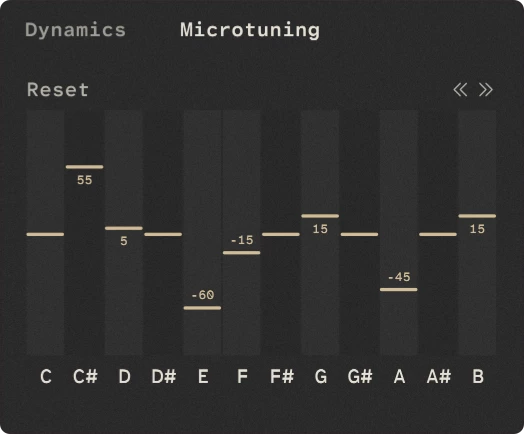
The Microtuning grid lets you adjust the tuning of each of the 12 notes in the chromatic scale independently. This is useful for creating alternative tunings or making small adjustments to the instrument’s standard tuning.
The microtuning works in conjunction with Rhapsody’s standard Coarse and Fine tuning controls found in the settings panel.
Each note can be adjusted in cents, with positive values raising the pitch and negative values lowering it. A value of 0 leaves the note at its standard tuning.
The controls affect all instances of the corresponding note across the instrument. For example, adjusting C# will affect every C# note, regardless of its octave.
It uses a fixed 12-note layout rather than a full scala style microtuning system.
The values you set are saved with your DAW session and custom presets.
The << and >> buttons shift the entire microtuning map down or up by one semitone. This allows you to transpose the tuning offsets while preserving the relative tuning between the notes.
Tip
Click Reset or Hold ALT and left-click the grid to reset all semitones.