Pedals
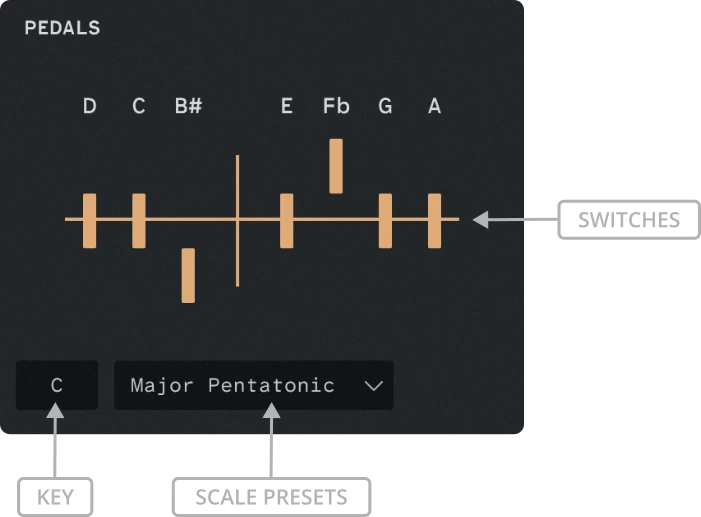
Pedal Positions
A concert harp has seven pedals. Each pedal affects every string of that note across the entire instrument.
The notes are displayed in pedal order (D, C, B, E, F, G, A), following the conventional layout used in harp notation.
How the Pedal System Works
The pedal diagram lets you configure the seven harp pedals, making it easier to play glissandos in different scales and keys.
Each pedal controls the pitch of one note name across all octaves. The three positions are:
- Up: Lowers the pitch by one semitone.
- Centred: Leaves the pitch unchanged.
- Down: Raises the pitch by one semitone.
The diagram displays the resulting note names above the pedals. These may include enharmonic equivalents, such as B♯ or F♭, which sound the same as C or E respectively.
The pedals can also be controlled through your DAW’s parameter automation.
Tip
Hold ALT and left-click the pedal diagram to reset it.
Selecting a Key and Scale
Use the left dropdown to select the root key, then choose a scale from the right dropdown. The pedal diagram updates to show the corresponding configuration.
Limitations
Some scales have fewer than seven distinct pitches, while others have more. As with a real harp, certain pedal settings may produce duplicate pitches or require a pitch to be omitted.